🎉 New Blogmere Theme! Give your journal the look of a print magazine.

Trusted by creators and developers for many years.

Create secure, independent websites with a privacy-first static CMS

Publii is a free, open-source desktop CMS. Create and update your website with visual editors, work offline, and publish fast static pages to your own hosting.

No database or PHP required on your server. No public CMS admin panel to break into. No tracking scripts unless you add them yourself.
No Publii account required. Available for Windows, macOS and Linux. Updated on What's new?

The Publii desktop app with the visual post editor open

Create a static website without the command line

Say goodbye to complex terminal commands and tedious dev environment setup. Create, edit, and publish your website with an intuitive desktop app.

  • Create website content in PubliiA visual editor with a formatting toolbar and an image inserted into an article.H₁BI

    Create without coding

    Write and organize your content in a desktop app. Publii generates your static website and publishes it to your preferred hosting, without build commands or a development environment to configure.

  • Editing website content while offlineAn article with a photo and text, with a disconnected Wi-Fi symbol in a circular badge.

    Work offline, keep full data ownership

    Draft articles and tweak settings without an internet connection or cloud account. Your files stay safely on your computer; connect only when you're ready to publish.

  • Website layouts built with PubliiContent blocks resize and shift between website layouts inside one browser window, with a blue landscape thumbnail in the right sidebar.

    Manage unlimited sites in one app

    Keep personal and client websites together in a free, open-source CMS. Each site has its own content, settings and publishing destination, with no per-site fee for the Publii application.

Zero CMS maintenance on your server

Publii keeps the CMS on your computer and publishes finished pages. Update your content without dealing with CMS updates, plugin conflicts, database maintenance or a public admin login on your web server.

Publii CMS files stored locallyContent, themes, plugins and the CMS database connect to a computer.ContentThemesPluginsDatabase
Your CMS stays on your computer
Static website files on your hostingA server delivers HTML, CSS and images as finished files.HTMLCSSImages
Your server simply delivers pre-built static files.

Eliminate common CMS security vulnerabilities

Your published website needs no Publii admin panel, PHP runtime or CMS database.

Start with privacy-friendly defaults

Publii adds no tracking services by default. Official themes serve their bundled fonts, scripts and other assets from your hosting.

Pre-rendered pages that load in milliseconds

Visitors receive finished HTML files. Responsive images, lazy loading, minification and WebP or AVIF help keep those pages light.

Keep control of your hosting

Your website is 100% portable-host it anywhere, move it anytime you can move to another compatible provider.

An offline website builder for everyday updates

Publish your next article, change your opening hours or add new work to your portfolio. You can manage the content yourself, without editing HTML for routine changes.

Block editor for visual content

Build articles from text, images and other content blocks. Move blocks to reorder your content and use visual controls to format each one.

Block editor guide

WYSIWYG editor for familiar formatting

Write and format content with a familiar toolbar. Add images, links and tables while seeing your text formatting as you work.

WYSIWYG editor guide

Markdown editor for plain-text writing

Write articles, tutorials and documentation with Markdown syntax. Keep your hands on the keyboard while adding headings, links, lists and code.

Markdown editor guide
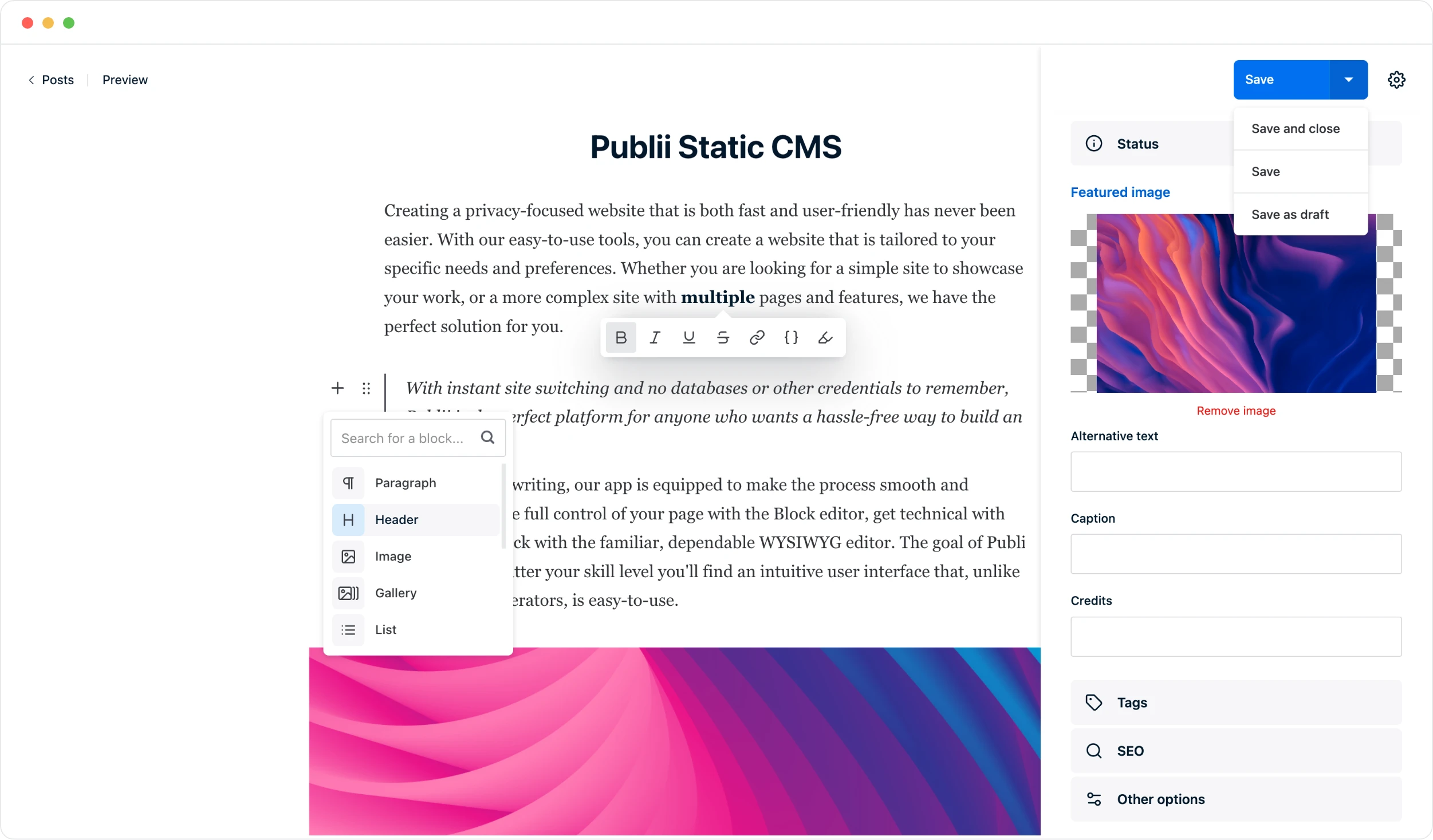
Publii Block editorAn article with text and an image, plus a block picker for paragraphs, headings, images, galleries and lists.Create a space for your ideas, share your work, or build a website withmultiple pages and features. Keep your content local and build at your own pace.With instant site switching and your content kept locally, you can focus onwriting and publish when you are ready, without a server to maintain.For everyday writing, build your page with blocks. Add your images,arrange the details and move between paragraphs, galleries and lists.Your content stays on your computer, ready for the next update.Preview your changes, make the final adjustments and publish.A website you can keep up to dateShare a project, add a new page or update your opening hours.Use headings to organise your story and images to show the details.Move each block into place, then preview the page before publishing.Work on a draft whenever you have time, even without a connection.Your posts, pages and images stay together on your computer.When everything is ready, publish the changes to your website.Make the next update just as simpleOpen your site, choose the page and pick up where you left off.Edit the words, replace a photo or add something new.Preview once more, then publish when you are happy with the result.Search for a block...ParagraphHeaderImageGalleryList
Publii WYSIWYG editorA visual article editor with formatting tools, images and a quote.FormatsParagraphRead moreHTMLMake room for your next ideaWrite a new article, update your opening hours or share your latest work.Format everything as you go. Your content stays on your device.A first draft does not have to be perfect. Take your time,find the right words, and publish when you are ready.A little space to focus.A simple routine for keeping your site currentStart with the details your visitors need: what is new, when you areopen and how to get in touch. Add a photo and give it a clear caption.Use headings and links to help readers find what matters.You can return to a draft later and carry on from where you stopped.Preview the page to check the layout before you publish.Ready for the next updateKeep your latest news, projects and useful pages together.Change a few words, add an image or link to a related article.Your content stays on your device while you work.When the page is ready, publish it to your connected website.The next time something changes, open Publii and update it here.
Publii Markdown editorA Markdown article uses headings, lists, links and image syntax.# Build a static website with PubliiWrite and edit your website in Publii, then publishit as **static files**. Your pages are served directly,without a database or a CMS running on the server.Keep your content local and update it at your own pace.## Why go static?- No server-side CMS or database to maintain- Publish HTML, CSS and JavaScript to your host> Edit offline. Connect when you are ready to publish.[Explore Publii](https://getpublii.com/)![A site built with Publii](./images/website.jpg)Build a blog, a portfolio or a site with several pages.Add images, choose a theme and preview each changebefore it goes live. You can keep working on a draftwithout an internet connection.## A straightforward publishing workflow1. Write your content and organise your pages.2. Preview the site and check the details.3. Publish the finished files to your connected host.A static site gives your server less to do. It servesready-made pages instead of building them from adatabase for each visit.## Keep control of your websiteKeep a local copy of your content and choose whereyour site is hosted. Update it whenever you need to.

Why people choose Publii

Unike Hoteller

“Publii works perfectly for us with 17 websites, each in 2-5 languages. Speed is the key - for the websites and for me in my daily work.”

Charlotte Jorgensen Freelance graphic designer and web designer, Norway unikehoteller.no
Charlotte Jorgensen

Science communication

“I am also glad I found Publii. It solves an important problem for me - and for many others. For example, we will use it in a PhD course on science communication, where the participants will create and publish content based on their research. Congratulations on your great work.”

Prof. Martin Rosvall Professor of Physics at Umeå University, Sweden martinrosvall.com

PublishDrive

“Publii offers a very user friendly interface for non-devs and makes publishing content very easy…”

Sergiu Iacob Head of Marketing at PublishDrive publishdrive.com

Peace of mind

“WordPress wore me out — constant updates, plugins breaking, security issues. I switched to Publii and finally found peace of mind.”

Kamil Porembiński Cybersecurity and AI expert, Poland kamilporembinski.pl

Making websites fun again

“I used Wordpress and other CMS options until I found Publii. So beautiful and intuitive - I manage multiple sites in English and Spanish quickly without fear of insecure plugins or critical updates. Cutting-edge premium themes and an amazing Publii team. Thanks for this treasure!”

Michael Walsh Front-End Web Designer & Developer, Chile walsh.cl

A lightweight WordPress alternative for blogs and business sites

Publii's built-in WordPress importer brings over most of your content in a single import, including posts, pages, images, authors and menus. Then keep editing in a visual desktop app, just as you did in WordPress.

  • Import your WordPress content

    Bring across posts, pages, images, authors and navigation menus from a WordPress WXR/XML export.

  • Review URLs and SEO data

    Keep existing slugs and import compatible metadata when it is included in the export.

  • Check the migration before switching

    Use the import report to review unresolved links, media and unsupported content. Its URL map helps you prepare redirects.

Choose a modern Publii theme and find suitable alternatives for the key features provided by your WordPress plugins.

Import WordPress content into PubliiA WordPress export transfers content, images, galleries, tags, authors, menus and SEO data to Publii.ContentImagesGalleriesTagsAuthorsMenusSEO data
Your WordPress content in Publii

SEO, AI search and privacy tools

Manage search settings and visitor privacy in Publii, with optional plugins for AI tools and crawler preferences.

Built-in SEO and performance

Manage how your website appears in search results and on social media. Publii includes sitemaps and RSS/JSON feeds, and supports JSON-LD structured data. Image optimization with WebP and AVIF support, lazy loading and lighter code help pages load quickly.

Explore SEO and performance

Tools for AI search and language models

Publish a content index with LLMS.txt Generator and Markdown versions of posts and pages with Markdown for AI. Configure rules for selected AI crawlers with AI Crawler Blocker.

Explore AI plugins

Privacy tools for GDPR and CCPA

Publii adds no tracking scripts by default, and official themes serve fonts and other assets from your hosting. Built-in cookie and consent controls help you manage third-party scripts and embedded content as part of your GDPR and CCPA setup.

Explore privacy tools

Your website.
Your hosting.

Publii runs on your computer, with your source content stored locally. Choose your hosting and move your website whenever you need.

Explore publishing options
  • GitHub Pages

    Static hosting for personal websites and projects, using a GitHub repository.

  • GitLab Pages

    GitLab's built-in static hosting, with automated deployments and access controls.

  • Netlify

    Managed hosting with a global CDN, automatic HTTPS and deployment rollbacks.

  • Amazon S3

    AWS object storage for static websites, with optional CloudFront delivery.

  • Google Cloud

    Cloud Storage hosting, managed alongside your other Google Cloud services.

  • FTP / SFTP

    A traditional hosting plan or your own server, using your existing connection details.

  • Manual export

    A portable folder of website files for custom uploads and deployment workflows.

Publii documentation and expert help

Find a guide, customize a theme or get help building your website.

Developer documentation

Build or customize Publii themes with documentation for theme structure, configuration and Handlebars templates.

Explore developer docs

Hire an expert

Our team can adapt an existing Publii theme or build a custom website around your requirements.

View services

Supported by our community

Publii is free to use. Donations and sponsorships help fund development and community support.

Support the Publii project

Create your first website with Publii

Join thousands of creators who chose independence. Create content locally and publish lightning-fast, secure websites on your own terms.

Download Publii

Free and open source. Windows, macOS and Linux.

Read the getting started guide