
Publii vs WordPress
Publii is a free, open-source desktop CMS and WordPress alternative that turns your content into a fast static website. There is no live database, PHP stack or public admin panel. It is built for blogs, documentation, portfolios and company sites that do not need complex server-side features.
Download Publii free Compare with WordPressQuick verdict
Which CMS should you choose?
For content-focused websites that do not need a live application backend, Publii offers a faster, simpler and more private foundation. WordPress is the better fit when a project depends on complex server-side features.
Choose Publii
For business websites, blogs, knowledge bases and portfolios – wherever maximum speed, high security and hassle-free hosting matter.
Choose WordPress
For complex ecommerce, memberships, user accounts, server-side integrations or multi-user browser-based publishing.
The better choice is the one whose architecture matches what your website actually has to do.
Direct comparison
Publii vs WordPress at a glance
Publii and WordPress can both power professional content websites, but their default architectures are different. Publii generates finished HTML before a visitor requests it. A conventional self-hosted WordPress setup keeps the CMS, PHP and database on the server to build or retrieve the response. That difference affects maintenance, exposure, hosting and delivery.
| PubliiStatic CMS | WordPressDynamic CMS | |
|---|---|---|
| Fast by default | Yes, pages are generated before publishing | Can be very fast with good hosting, caching and optimization |
| Public server stack | Static files only. No Publii admin, PHP or database required | WordPress, PHP and a database in a conventional installation |
| Live CMS attack surface | Smaller by design. No public Publii login or CMS runtime | Broader. Core, admin, PHP, database, themes and plugins remain online |
| Server-side CMS maintenance | No Publii core, database or server-side plugins to patch on the published site | Core, themes, plugins, PHP and the database need updates or managed hosting |
| Typical hosting cost | Can use free or low-cost static hosting; no PHP or database plan required | Can be inexpensive, but needs WordPress-compatible PHP and database hosting |
| Hosting independence and portability | Standard HTML, CSS and media files; switch between any hosting providers, static hosts or CDNs with ease | Portable, but migration also includes the database, themes, plugins and server settings |
| Offline editing | Built in | Not the standard workflow |
| Privacy-first workflow | Yes, local-first desktop app | Depends on hosting, plugins and configuration |
| Cookie and embedded-content consent | Built in | Commonly added with plugins or third-party tools |
| GDPR-friendly starting point | Local app, local theme assets and built-in consent controls reduce the setup required | Can be GDPR-friendly, but depends more on hosting, themes, plugins and third-party services |
| SEO fundamentals | Built in | Strong foundation, commonly extended with SEO plugins |
| Static HTML output | Yes, by design | Not by default |
| Image optimization | Responsive images, lazy loading and WebP support built in | Available through core features, hosting and plugins |
| Complex ecommerce, memberships and user accounts | Limited or integration-based | Major strength |
| Multi-user browser editing | Local desktop workflow; not a shared browser CMS | Built in for browser-based editorial teams |
This comparison assumes a standard Publii static deployment and a conventional self-hosted WordPress setup. Managed hosting, full-page caching, headless architectures and third-party services can change individual results.
... I switched from WordPress to it and I love it ...
... I’m still a big fan of Publii; it’s a visual editor that lets non-technical people use static site generation ...
... my tech lead on Publii: “it’s all so intuitive… something must be wrong ...
... I've been interested in static sites for a while now. Publii just caught my eye. The interface is 🔥. Even non-devs can rock this! ...
... a very friendly and optimized solution for creating ultra-fast websites. Best alternative to your slow loaded website ...
... Publii is by far the best way to manage static websites. Best CMS i have seen in a long time! ...
... I just found Publii, it is all I've been looking for: #opensource CSM that uses GitHub pages with a graphic interface ...







Why Publii?
Why choose Publii over WordPress?
WordPress is popular for a reason. It has an enormous ecosystem, thousands of integrations and enough flexibility to power everything from a small blog to a serious ecommerce business.
That flexibility can also create a long chain of dependencies: a database, PHP, a theme, plugins, caching, backups, security tooling and hosting capable of keeping everything running.
Publii takes a different route. You manage the site in a desktop app, then Publii generates the finished HTML, CSS and media files before publishing them to your chosen host.
If the main job of your website is to publish content, the public site does not need to run the CMS itself. You keep control of the working project, choose the host and decide when the finished website goes online.
Publishing
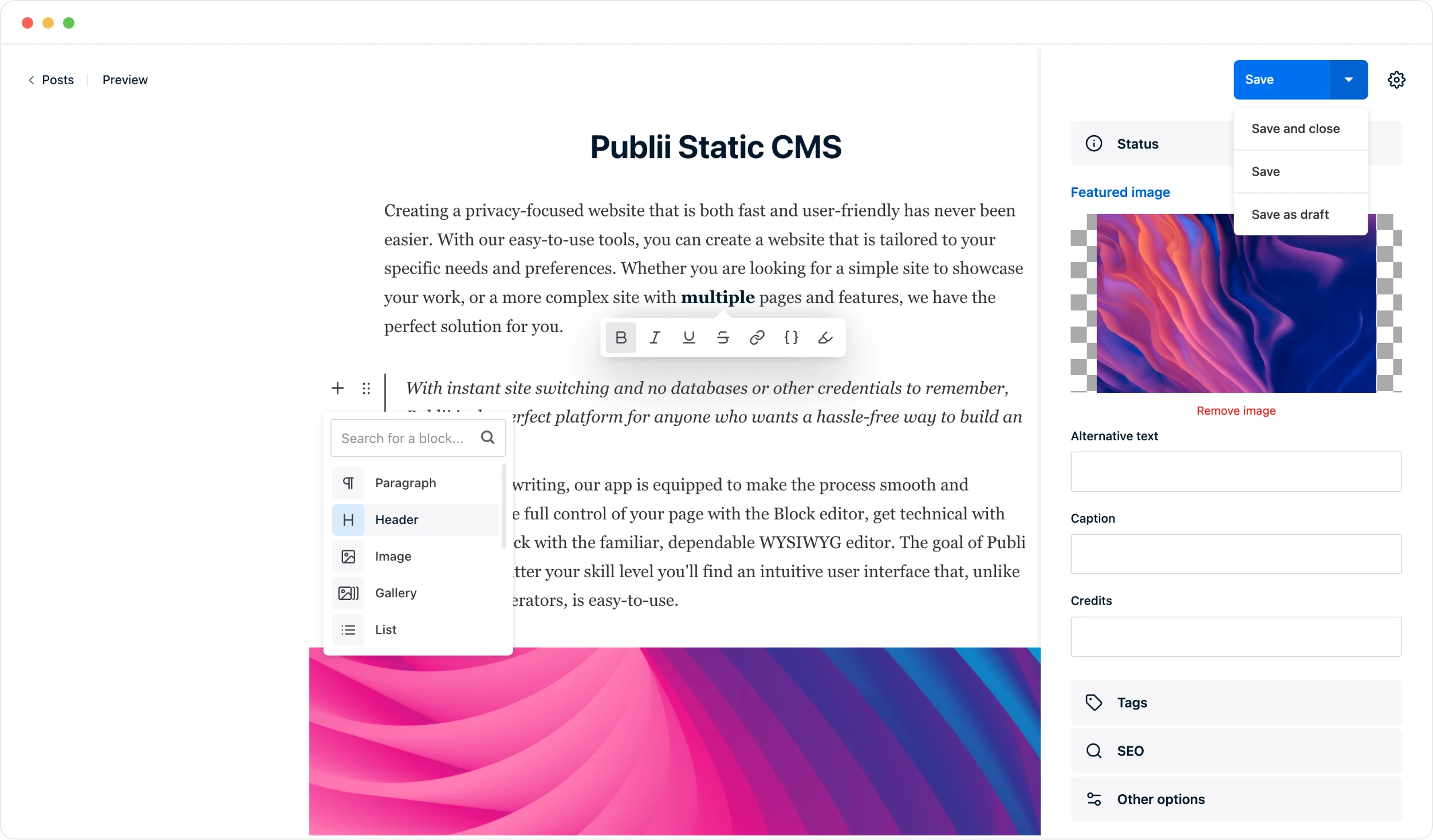
Writing in Publii still feels like using a real CMS
"Static CMS" can sound like developer shorthand for writing Markdown files in a code editor. That's not what Publii is.
You can write with a block editor, a traditional WYSIWYG editor or Markdown. You can manage authors, tags, media, galleries, tables and embeds without touching the generated HTML.
Publii also gives you practical writing tools such as word count, character count and estimated reading time. The editing experience stays separate from the technology used to publish the final site.
In other words: you get a visual publishing app; your visitors get a static website.
The editors go beyond plain text. You can add image galleries, video, downloadable files, tables, code highlighting and reusable content patterns without turning the writing workflow into a page builder.
Your content also stays portable. Publii is not a rented publishing platform or an algorithmic feed. You manage the project yourself, publish it on your terms, and keep control over where the finished website lives.
Privacy
Privacy starts before the visitor even opens your website
Publii is local-first. Your working site lives on your computer, and you can write, edit and preview it without logging into a hosted CMS.
That means your drafts don't have to live in a public administration panel just because the finished website needs to be online.
The same approach carries over to visitors. Publii includes tools for cookie consent, consent for embedded third-party content, privacy-friendly video handling and Google Consent Mode v2 integration.
Privacy for publishers too
No cloud sync. No account required. No telemetry.
Publii can run entirely on your computer. You do not need a cloud account or an email login to write and build your site, and Publii states that the app collects no telemetry or usage statistics.
Your drafts, media and site settings stay in the local project until you choose to publish. You can prepare and preview changes locally, then send the generated website files to the hosting provider you choose.
Local theme assets
Theme assets stay on your site
Official Publii themes keep their own assets, including fonts, scripts, icons and CSS, local rather than automatically pulling them from third-party CDNs.
A basic Publii website using an official theme and no third-party extensions is GDPR-friendly by default: its assets stay local and nothing is automatically fetched from external providers. If you add analytics, embeds, ads or other services, Publii's consent tools help you configure them responsibly.
SEO & AI visibility
SEO is built into the publishing workflow
WordPress offers mature SEO plugins and advanced workflows. Publii includes the everyday technical controls in the publishing process, so most content sites can manage search visibility, metadata, URLs, sitemaps, sharing previews and image delivery without assembling a separate SEO plugin stack.
Publii's SEO settings let you configure page titles, meta descriptions and meta robots for the homepage, post listings, tag and author pages, search results and the error page. You decide which page types can be indexed, whether their links are followed and whether search engines may store cached copies.
You can also keep pagination out of search results, choose what belongs in the XML sitemap, exclude individual files, configure readable URLs and prefixes, and generate Open Graph and Twitter Card data with fallback images. Full post pages can include Microdata markup automatically.
Publii generates semantic HTML, and its in-house themes use plain HTML, CSS and vanilla JavaScript. Important content is available directly in the page source without depending on a heavy front-end framework to render it.
For most content sites, that's exactly what you want: the important text is already in the page source, URLs are understandable, metadata is predictable and the site is easy for crawlers to fetch.
What about AI search and GEO?
Publii supports AI discovery with crawlable static HTML, configurable crawler access and optional plugins that publish an llms.txt index and Markdown versions of posts and pages. These features give search and answer engines clear, lightweight ways to find and parse public content.
There isn't a secret "AI SEO" switch that suddenly makes a page visible in ChatGPT, Google AI Overviews or other answer engines.
Google confirms that AI Overviews and AI Mode do not require special AI markup or a separate schema. The same fundamentals still matter: useful original information, crawlable text, descriptive headings, reliable metadata and internal links.
For ChatGPT search, your robots.txt and hosting must allow OAI-SearchBot. GPTBot is a separate control for potential model training, as explained in OpenAI's publisher guidance.
The same SEO settings also let you block GPTBot, ChatGPT-User and Common Crawl's CCBot without editing robots.txt by hand. Publii writes those choices into the generated file automatically. If you add a custom robots.txt, it takes precedence and you manage the crawler rules yourself.
Publii already gives search engines and AI systems straightforward HTML to work with. Two focused plugins extend that foundation with dedicated machine-readable files.
The LLMS.txt Generator creates a structured, customizable index that helps AI tools find the site's most important content. Markdown for AI generates a clean .md version alongside every published post and page, giving tools that prefer Markdown a direct version of each article.
These files make content easier to discover and parse. They do not guarantee that an AI service will crawl, cite or recommend a page. The content still needs to be original, useful and worth citing.
Performance
Publii starts fast because the page is already built
With Publii, normal content pages are generated before they reach your hosting.
So when somebody opens an article or company page, the server doesn't need to ask WordPress, PHP and a database to assemble the page first. It can simply return the files Publii already created.
WordPress can get very close to this experience with full-page caching, a good CDN and well-configured hosting. A carefully built WordPress site can be genuinely fast.
The difference is where you start. Publii is static first. WordPress is dynamic first and is often made faster by caching the result.
Publii also includes responsive images, lazy loading, minification and automatic WebP conversion for JPG and PNG images, so some of the everyday performance work is handled before deployment.
Publii request
The page is already there.
- Visitor requests a page
- Hosting returns ready-made HTML, CSS and media
- Page is displayed
Conventional WordPress request
The application may need to build the response.
- Visitor requests a page
- Web server and PHP handle the request
- WordPress, theme and plugins run
- Database may be queried
- Page is returned
Full-page caching can bypass much of this request path on a well-optimized WordPress site.
Static files are also straightforward to scale. On CDN-backed hosting, traffic can be served without scaling a database or PHP application in the same way a conventional dynamic CMS may require. Hosting still matters, but the public workload is much simpler.
Security
Security gets simpler when there is less CMS to expose
We don't think "WordPress is insecure" is a useful argument. A well-maintained WordPress site can be secure. A badly configured static site can still be compromised.
The more useful question is: what is actually exposed on the public server?
In a conventional WordPress installation, the live site normally includes WordPress core, authentication and administration endpoints, PHP, a database, theme code and whatever server-side plugins the project depends on.
Publii doesn't put an equivalent CMS stack online. There is no public Publii admin panel, no Publii login endpoint, no database required on the published site and no PHP runtime required for a standard Publii-generated website.
That doesn't remove every security responsibility. Hosting credentials still matter. Custom code still matters. Third-party scripts and external services still matter.
What it does remove is a large part of the CMS-specific server-side surface that would otherwise have to stay patched and protected.
Maintenance
There is simply less server-side CMS maintenance
A conventional WordPress site asks you or your managed host to maintain core, themes, plugins, backups, security and the PHP environment.
Managed WordPress hosting can take a lot of that work off your plate. That's one of the strongest reasons to pay for a good managed host.
Publii approaches the problem differently. You should still update the desktop app, theme and extensions, but the published website does not need a live Publii core, database or server-side plugin runtime.
For a content site, that's a meaningful difference. You spend more time publishing and less time keeping the publishing machinery alive.
Workflow & hosting
Publii works offline and doesn't tie you to special hosting
Because the CMS is a desktop app, you can work without being connected to your production server. Write on a train. Prepare an update while the site is offline. Preview changes locally before anyone else sees them.
When you're ready, Publii can publish through traditional FTP or SFTP, or deploy to services such as Netlify, GitHub Pages, GitLab Pages, S3-compatible storage and Google Cloud. You can also export the site manually.
The final output is made from ordinary web files, so there is no special Publii server stack to buy or stay compatible with. You can move the site between any hosting providers without migrating a live application, database or PHP environment.
Dynamic features
What if you need comments, search, analytics or other dynamic features?
Static doesn't mean frozen.
A Publii site can still use search, comments, analytics, forms and other interactive features through plugins, JavaScript or focused external services.
The difference is that those features can be added where you actually need them instead of making the entire website dependent on a dynamic CMS runtime.
This works well for content-first websites. It works less well when dynamic application logic is the product itself.